
Xuper TV on Android TV: Compatibility, Setup, and Installation Guide
Xuper TV on Android TV
Xuper TV is an app associated with live TV channels and on-demand entertainment, including movies and shows. If you want to use Xuper TV on Android TV, understanding device compatibility and installation requirements is important before getting started. Unlike apps available directly through the Google Play Store, an APK-based app may require additional installation steps.
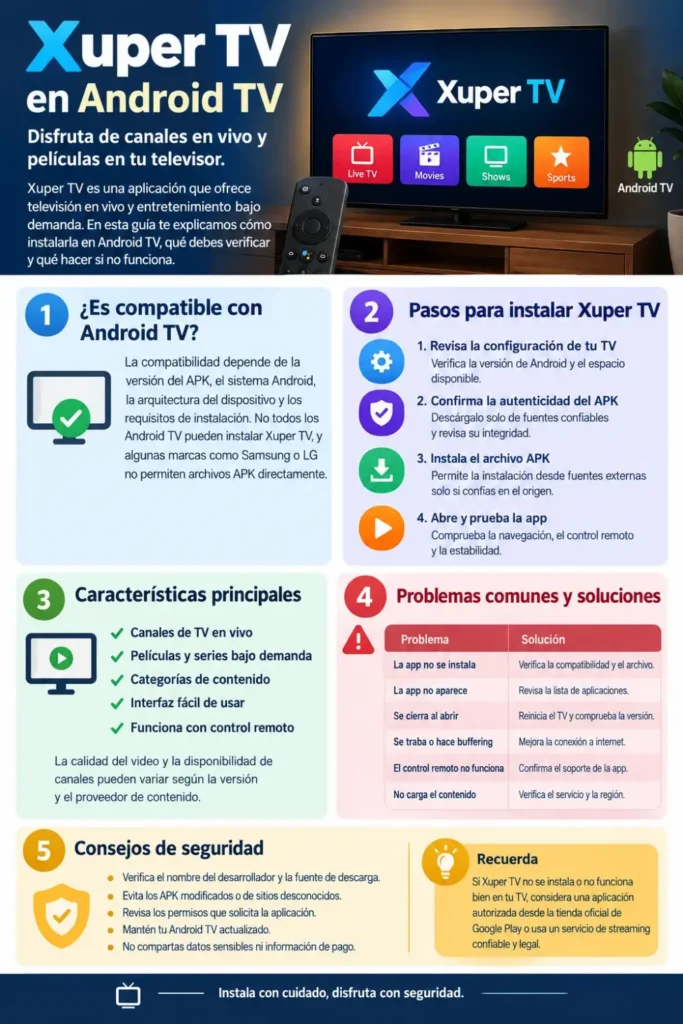
This guide explains how to check whether your Android TV supports Xuper TV, how APK installation works, and what to do if the app does not install or run correctly. It also covers important security checks, streaming problems, and practical tips to help you decide whether installing the app is appropriate for your device. Availability and functionality may vary by app version, TV model, and content provider.
Is Xuper TV Compatible With Android TV?
Xuper TV compatibility depends on the specific APK version, Android operating system version, device architecture, and installation requirements. Some Android TV devices may support compatible Android APKs, while others may reject them or display an interface designed primarily for touchscreens. There is no guarantee that every Android TV or Google TV device will run Xuper TV successfully.
You can also read: Xuper TV APK v7.2.5 Review
Before installing it, check your television’s software information and confirm that the APK comes from a trustworthy, verifiable source. Also consider whether the app requires permissions or services that your television cannot provide. If the app is unavailable through an official app store, treat compatibility claims on third-party websites with caution.
Xuper TV Android TV Compatibility Checklist
Use the following checklist before attempting an installation. These checks can help identify common compatibility problems without changing your TV’s security settings unnecessarily.
| Compatibility factor | What to check |
|---|---|
| Operating system | Confirm that your TV runs Android TV or Google TV |
| Android version | Check the version in your TV’s system settings |
| APK architecture | Verify that the package supports your device |
| Storage | Ensure sufficient free space for installation and app data |
| Remote navigation | Check whether the app supports directional buttons and selection |
| App source | Verify the publisher, file integrity, and download source |
| Content access | Confirm that the service is available and authorized in your region |
Important: Google TV is built on Android, but compatibility still depends on the individual app. Samsung Tizen TVs and LG webOS TVs generally cannot install Android APK files directly.
How to Install Xuper TV on Android TV
If you have verified that the APK is legitimate, compatible with your device, and legally available for your intended use, the general installation process is similar to installing other compatible Android applications outside the Play Store. The exact menus may differ depending on your TV manufacturer and Android version.
Step 1: Check Your TV Settings
Open your television’s settings and locate the device information section. Depending on the model, this may appear under Settings → System → About or Settings → Device Preferences → About. Check the Android version and available storage before proceeding.
Next, look for Xuper TV through the Google Play Store on your television. If an authorized version is available, using the store is generally preferable because it provides a more straightforward installation and update process. If the app is not listed, do not assume that an APK from an unrelated website is authentic.
Step 2: Verify the APK File
An APK is an Android application package used to distribute and install Android apps. Before opening any APK, verify who published it, whether the download source is authentic, and whether the file’s integrity can be checked against a trusted reference. A website calling itself an official source does not, by itself, establish that its files are safe.
Avoid modified packages, repackaged installers, and files that request unexpected permissions. If the publisher cannot be verified or the file triggers a credible security warning, do not proceed. A newer version number alone is not proof that an APK is genuine.
Step 3: Install the APK
If you have confirmed the package’s authenticity and compatibility, use the installation method supported by your TV. On compatible Android TV devices, this may involve transferring the APK from a trusted computer or USB drive, or using a reputable file-management application that supports your device.
Some devices require permission for a particular app to install applications from outside the Play Store. Only consider changing this setting when necessary and when you trust the source. Menu names vary by manufacturer and software version; avoid disabling broader security protections just to force an installation.
Step 4: Open and Test the App
After installation, look for the app in your television’s app list. If it does not appear on the home screen, check the full app list and confirm that installation completed successfully. Some applications designed for phones do not appear in the usual Android TV launcher.
If the app opens, test its basic navigation and playback functions using content you are authorized to access. Check whether the remote control works, whether the interface fits the screen, and whether the app remains stable. If it repeatedly crashes or behaves unexpectedly, uninstall it rather than attempting to bypass system warnings.
You can also read: Xuper TV 6.6.0 for Android
How to Set Up Xuper TV on Android TV
Once a compatible app is installed, its initial setup will depend on the version and service configuration. Some applications open directly to a home screen, while others may request account details, connection settings, or additional permissions. Only provide information that is necessary and appropriate for a verified service.
For the best initial experience, connect your television to a stable internet connection, review the app’s available settings, and test navigation before relying on it for regular viewing. Do not enter payment information or reuse an important password in an app whose publisher and privacy practices you cannot verify.
Xuper TV Features on Android TV
Xuper TV is commonly described as offering live television and on-demand entertainment. However, the actual features available to an individual user depend on the installed version, service access, and the rights associated with the content. The following table describes potential uses rather than guaranteeing that every feature will be available.
| Feature | What to expect |
|---|---|
| Live TV | May provide access to available live channels |
| Movies and shows | On-demand categories may be offered |
| Content categories | May help organize different types of entertainment |
| TV-screen viewing | Depends on interface and display compatibility |
| Remote navigation | Depends on whether the app supports TV input |
| Streaming quality | Varies with connection speed and source reliability |
A television-oriented interface can make browsing more convenient, but it does not guarantee smooth playback. Video quality, channel availability, subtitles, and other features should be checked in the actual version rather than assumed from promotional descriptions.
Common Xuper TV Installation Problems and Fixes
Installation and playback errors can result from incompatible software, damaged installation files, insufficient storage, network problems, or issues with the service itself. Identifying the specific error is more useful than repeatedly downloading APK files from different websites.
| Problem | Possible cause | What to try |
|---|---|---|
| App not installed | Incompatible or damaged APK | Verify compatibility and file integrity |
| App does not appear | Phone-oriented app interface | Check the full app list and launcher compatibility |
| App crashes on launch | Software conflict or unsupported version | Restart the TV and check for legitimate updates |
| Buffering during playback | Weak connection or overloaded source | Test the network and restart the router |
| Remote buttons do not work | Interface designed for touchscreens | Check the app’s TV-input support |
| Content does not load | Service outage or access restriction | Check the provider’s status and regional availability |
| Insufficient storage | Limited free space | Remove unused apps and files |
Fixing the Most Common Errors
Start with simple checks before changing security settings or reinstalling the app. Restart your TV, confirm that the internet connection works, and check the available storage. If an error persists, record the exact message and compare it with the requirements of the app version you installed.
Clearing an app’s cache may help with temporary problems, but clearing its data can remove settings or sign-in information. Reinstalling an APK should only be considered after verifying the replacement file’s authenticity. If the application requires unsupported software or repeatedly triggers security warnings, the safer option is to stop using it.
Is Xuper TV Safe to Use on Android TV?
The safety of Xuper TV cannot be established simply by its name, appearance, or advertised features. APK files obtained outside established app stores may not receive the same review and distribution protections available through those stores. A file can also be modified after publication, so users should not rely solely on a website’s claims that a download is official or secure.
Before installing an app, consider these precautions:
- Verify the publisher and download source independently.
- Avoid modified APKs and installers from unfamiliar download pages.
- Review permissions and reject requests unrelated to the app’s purpose.
- Keep Android TV and its security updates current.
- Never provide sensitive account or payment details to an unverified service.
- Confirm that the content you access is legally available in your region.
Streaming rights also matter. An app’s ability to display a channel or movie does not necessarily mean that the distributor has permission to offer it. When a provider’s legitimacy cannot be established, consider an authorized streaming service available through your TV’s app store.
Tips for Better Streaming Performance on Android TV
Even a compatible streaming application can perform poorly when the internet connection is unstable or the device has limited resources. A few basic maintenance steps can help you distinguish network problems from app compatibility issues.
- Use a stable connection: Ethernet may provide more consistent performance when supported. Otherwise, use a reliable Wi-Fi connection.
- Check available storage: Remove unused apps and unnecessary files if your TV is running low on space.
- Keep the system updated: Install operating system updates supplied by your TV manufacturer.
- Close unnecessary apps: Reduce competing resource usage when performance is limited.
- Check the content source: If only one channel fails, the problem may be with that source rather than your TV.
- Avoid unverified add-ons: Extra tools advertised as streaming boosters may introduce privacy or security risks.
If buffering continues, test another authorized streaming app on the same network. When other services work normally, the issue may be specific to the app or its content source. When all streaming services struggle, investigate the internet connection or television hardware first.
Frequently Asked Questions
Can I install Xuper TV on any Android TV?
No. Compatibility depends on the Android version, device architecture, APK requirements, and app interface. Some Android TV devices may support a compatible package, while others may reject it or run it poorly.
Is Xuper TV available on the Google Play Store?
Availability can change, and the app’s current official store status should be verified directly through Google Play. If you cannot find a verified listing, do not treat an APK download page as proof of official distribution.
Can I install Xuper TV on Google TV?
Some Google TV devices can run compatible Android applications, but this does not guarantee that a particular Xuper TV APK will install or work properly. Check the device requirements and the app’s authenticity before proceeding.
Why does Xuper TV install but not open?
Possible reasons include an incompatible Android version, an unsupported device architecture, a damaged APK, or a problem within the application. Restart the TV and verify the installation file before considering other troubleshooting steps.
Does Xuper TV work with a TV remote?
That depends on the app’s interface. Applications designed primarily for touchscreens may not support all directional buttons or remote-control functions on a television.
Can I use Xuper TV on a Samsung or LG Smart TV?
Samsung TVs generally use Tizen, while LG TVs generally use webOS. These platforms do not normally install Android APK files directly. Check your TV’s app store for compatible, authorized alternatives.
How can I update Xuper TV on Android TV?
First check whether a verified app-store update is available. If the app is distributed outside an app store, verify the publisher, release information, and file integrity before considering an update. Avoid installing an unknown package over an existing application.
Is Xuper TV free to use?
Pricing and access conditions depend on the specific service and version. Do not assume that an advertised free download means all channels or content are free, authorized, or permanently available.
You can also read: Xuper TV APK v6.5.7 Latest Version
Conclusion
Using Xuper TV on Android TV starts with three important checks: operating system compatibility, APK authenticity, and safe access to the content. An Android-based television may support compatible APK installations, but individual apps can still fail because of software requirements, interface limitations, or service availability.
Before proceeding, prioritize verified downloads, current device software, and authorized streaming options. If Xuper TV does not install or operate reliably on your television, choosing an established app from the TV’s official app store is generally the more straightforward alternative.