
Xuper TV No Funciona Hoy: Common Causes and How to Fix It
If Xuper TV is not working today, there is usually a simple reason behind it. The app may be stuck on loading, crash after opening, fail to install, or stop showing sports, movies, or series.
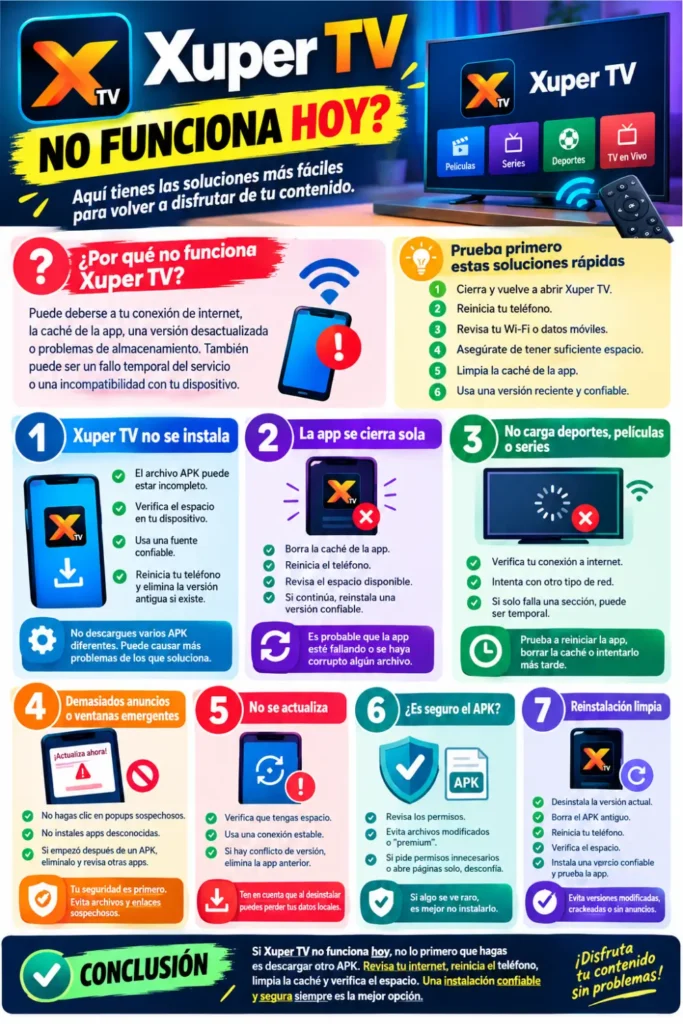
Before downloading another APK, try a few basic fixes. In many cases, the problem is related to your internet connection, app cache, storage, or the version you have installed.
Why Is Xuper TV Not Working?
The exact cause depends on what the app is doing. If it opens but content does not load, your internet connection may be the problem. If it keeps closing, the app files or installed version could be causing the issue.
Some common reasons include:
- Weak or unstable internet
- Outdated or damaged APK
- Corrupted cache
- Low phone storage
- Android compatibility issues
- Temporary service problems
- Conflicting app installation
You can also read: Xuper Tv Official Site: Codes
Try These Quick Fixes First
You do not need to reinstall the app straight away. Start with the basic steps and check whether the problem disappears.
- Close Xuper TV completely and open it again.
- Restart your phone.
- Check your Wi-Fi or mobile data.
- Make sure you have enough free storage.
- Clear the app cache.
- Check whether you are using a recent and trusted version.
If the app still does not work, then move on to the specific problem below.
Xuper TV Is Not Installing
If the APK will not install, the downloaded file may be incomplete or incompatible with your phone. An existing Xuper TV installation can also cause a conflict when you try to install another version.
First, delete the old APK file and restart your phone. Check your available storage and make sure the file came from a source you trust. If another version is already installed, Android may also reject the new package because of a signing or compatibility conflict.
Avoid downloading several random APKs just to find one that installs. This can create more problems than it solves.
Xuper TV Opens and Then Closes
If the app opens for a few seconds and then disappears, it is probably crashing. This can happen after an update or when temporary app files become corrupted.
Try clearing the cache first:
Settings → Apps → Xuper TV → Storage → Clear Cache
Then restart the app. If it continues crashing, check your phone’s free storage and consider reinstalling a trusted version.
You can also read: Xuper TV 4.34.3 Version
Sports, Movies or Series Are Not Loading
If Xuper TV opens normally but a particular section does not load, check your internet connection first. Try switching from Wi-Fi to mobile data, or the other way around.
If everything else on your phone is working but only one section of Xuper TV is unavailable, the issue may be temporary. In that situation, repeatedly reinstalling the app may not help.
You can try:
- Refreshing the app
- Restarting your phone
- Clearing the cache
- Checking your internet connection
- Trying again later
Xuper TV Is Very Slow
Slow loading is often caused by a weak connection or too many apps running in the background. Your phone can also become slower when storage is almost full.
Close apps you are not using, restart the phone, and test Xuper TV on a stable internet connection. Clearing the cache can also help if the app has been running for a long time without being cleaned.
Too Many Ads or Strange Popups
Ads may appear in Xuper TV, but there is a difference between normal advertising and suspicious behavior. If your browser keeps opening by itself or you see messages telling you to install a strange update, be careful.
Do not click popups claiming that your phone is infected or that you must install another player. These messages may come from a problematic APK or an advertisement rather than Xuper TV itself.
If this started after installing a particular APK, remove that version and check your phone for other recently installed apps.
Xuper TV Is Not Updating
An update can fail because of low storage, a damaged download, or a conflict with the version already installed.
Make sure you have enough free space and a stable internet connection. If Android reports a package or signature conflict, the existing version may need to be removed before installing another compatible version.
Remember that uninstalling an app can remove its locally stored data, so only do this if you are comfortable with that.
Is the APK Safe to Use?
This is important when troubleshooting any third-party APK. Two files can have the same app name but come from completely different sources.
Be careful if an APK:
- Asks for unnecessary permissions
- Opens websites without your action
- Shows unusually aggressive popups
- Tries to install other apps
- Triggers an Android security warning
Do not disable important security protections just to make an APK install. If the file behaves strangely, removing it is safer than trying to bypass the warning.
You can also read: Xuper TV 5.1.4 APK Version Details
Safe Way to Reinstall Xuper TV
If nothing else works, a clean reinstall is worth trying. Before doing it, remember that uninstalling the app may remove its saved settings or local data.
- Uninstall the current Xuper TV version.
- Delete the old APK from your Downloads folder.
- Restart your phone.
- Check that you have enough storage.
- Get a trusted version from a reliable source.
- Install it and test the app again.
I would avoid modded, cracked, patched, premium-unlocked, or “no ads” versions. They are not a good solution to a normal app problem and may behave differently from the original build.
Quick Troubleshooting Guide
| Problem | What to Try |
|---|---|
| App won’t install | Check APK, storage and compatibility |
| App keeps crashing | Restart and clear cache |
| Movies won’t load | Check internet and cache |
| Sports not showing | Refresh and test another network |
| Series keeps loading | Restart and try again later |
| App is slow | Close background apps and restart |
| Update fails | Check storage and package conflict |
| Strange popups | Avoid the APK and check browser settings |
Conclusion
If Xuper TV is not working today, don’t immediately assume that you need a new APK. Start with your internet connection, restart the phone, clear the cache, and check available storage.
If the problem started after installing a particular APK, pay attention to its source and permissions. A clean, trusted installation is generally a better option than repeatedly trying modified or suspicious versions.