
Xuper TV Cellular 7.2.6: Installation Steps and App Details
Xuper TV Cellular 7.2.6 is an Android app version that is promoted for watching video content on mobile phones. If you want to install it on your device, you should first check the Android requirements, download source, available storage, and app permissions. The installation process may only take a few minutes, but the exact steps depend on your Android version and phone manufacturer.
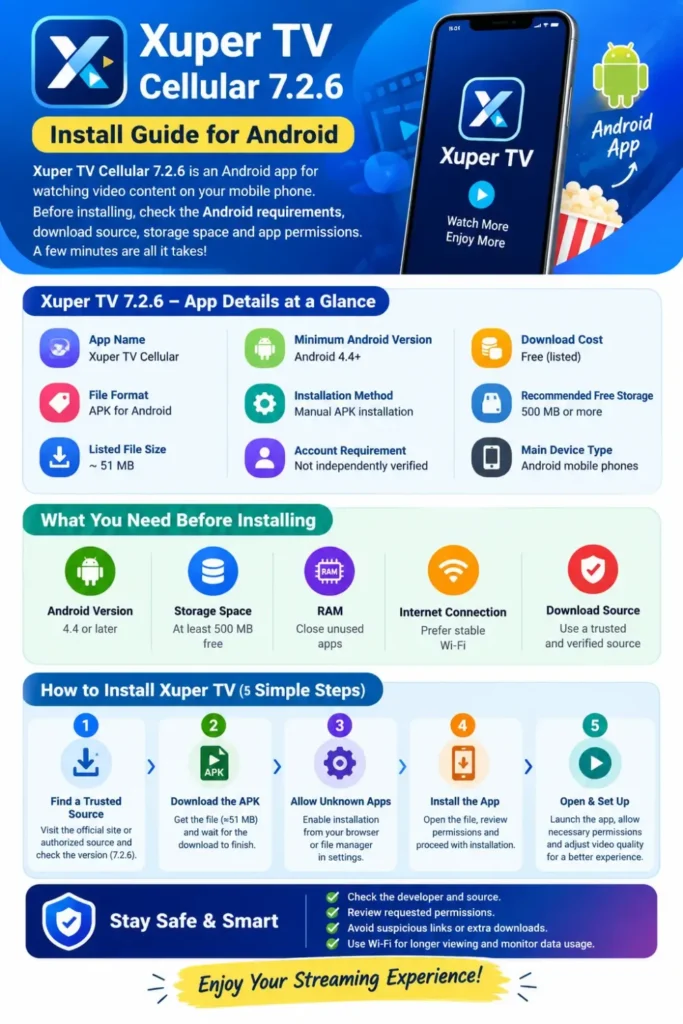
This guide explains the Xuper TV 7.2.6 installation process, requirements to check before downloading, how to manage unknown app permissions, and what to do if the app doesn’t work properly. It also covers mobile data usage, common installation errors, and important security checks to help you make an informed decision.
Xuper TV 7.2.6: App Details at a Glance
The following table summarizes the information provided for this version. Confirm the details against the actual APK file before proceeding.
| App detail | Information |
|---|---|
| App name | Xuper TV Cellular |
| Version | 7.2.6 |
| File format | APK for Android |
| Listed file size | Approximately 51 MB |
| Listed minimum Android version | Android 4.4+ |
| Installation method | Manual APK installation |
| Account requirement | Not independently verified |
| Download cost | Listed as free |
| Recommended free storage | 500 MB or more |
| Main device type | Android mobile phones |
A free download does not automatically mean that every channel or feature is free, safe, or legally available. Check the app’s permissions, privacy information, and content licensing before using it.
You can also read: Xuper TV APK Smart TV 4.34.5 Free Download
What Are the Requirements for Installing Xuper TV on a Mobile Phone?
Before downloading Xuper TV Cellular 7.2.6, check your phone’s Android version, available storage, RAM, and internet connection. Meeting the listed minimum requirements does not guarantee that the app will run smoothly, especially on older devices or phones with limited memory.
For a better experience, keep some storage free and use a stable internet connection. The following table provides practical guidance, rather than guaranteed official hardware specifications.
| Requirement | Basic check | Recommended practice |
|---|---|---|
| Android version | Check whether the phone meets the listed Android 4.4 minimum | Use a supported, updated Android version |
| Storage | Allow space for the 51 MB APK and installation | Keep at least 500 MB free |
| RAM | Check your phone’s available memory | Close unnecessary apps before streaming |
| Internet | Use a stable connection | Prefer reliable Wi-Fi for longer viewing |
| App source | Verify the download source | Avoid modified or suspicious APK files |
How to Check Your Android Version
Open Settings on your phone and look for About phone or About device. Depending on the manufacturer, you may find the Android version under Software information. Compare the version displayed with the requirements listed by the app distributor.
Also check your available storage under Settings and Storage. If your phone is almost full, remove unnecessary downloads or unused apps before installing. Avoid deleting system files or personal data without a backup.
How to Install Xuper TV Cellular 7.2.6 on Android
The installation process depends on whether the app is distributed through an official app store or as an APK file. If a legitimate, verified APK is available, Android may require you to authorize the app that opens the downloaded file. Follow these steps only after checking the file’s source and safety.
Step 1: Find a Trustworthy Download Source
Visit the app developer’s verified website or another source authorized by the developer. Check that the listing identifies version 7.2.6 and provides reliable information about the publisher, permissions, and file integrity.
Do not assume that a website is official simply because it uses the Xuper TV name or displays a download button. If the developer’s identity cannot be verified, or the site asks you to install additional apps, enter payment details unexpectedly, or provide sensitive information, stop and investigate before proceeding.
Step 2: Download the APK File
If you have verified the source, download the APK directly to your Android phone. A file listed as 51 MB may take longer to download on a slow connection, so wait until the download finishes completely before opening it.
Check the downloaded filename, file size, and version information when available. A matching filename or size alone cannot prove that a file is authentic or free from malware.
Step 3: Review the Unknown-App Permission
Android normally restricts installations from sources outside approved app stores. If you trust the APK source and decide to continue, you may need to allow the browser or file manager to install unknown apps.
The menu names vary by Android version and manufacturer. Common paths include:
| Device or Android version | Where to look |
|---|---|
| Older Android versions | Settings → Security → Unknown sources |
| Android 8 and later | Settings → Apps → Special app access → Install unknown apps |
| Samsung phones | Settings → Security and privacy or Apps → Install unknown apps |
| Xiaomi phones | Settings → Apps or Privacy-related settings → Special permissions |
Use the Settings search bar if these menu names do not match your phone. Enable permission only for the specific browser or app that needs it, and turn it off again after installation.
Step 4: Open the APK and Review the Installer
Open your Downloads folder or tap the completed download notification. If Android displays an installation screen, review the app name and the requested permissions before choosing whether to proceed.
Do not ignore a security warning simply because the file size matches the listing. If Google Play Protect flags the APK, stop and verify the warning with a trustworthy source. Avoid disabling device security protections to force an installation.
Step 5: Open the App and Check Its Settings
If installation completes successfully, locate the app icon in your app drawer and open it. Review any permission requests carefully, and allow only those that are necessary for the features you intend to use.
If the app offers video-quality settings, choose a lower resolution when using mobile data or when your connection is unstable. Check that the available content and features work as described, and avoid entering passwords or personal details unless the developer’s identity and privacy practices have been verified.
You can also read: Xupers TV Official Check Magis TV
How to Use Xuper TV on Mobile Data
Streaming video can consume a significant amount of mobile data. The exact amount depends on the video resolution, compression, frame rate, and streaming service, so the following figures are estimates rather than fixed Xuper TV measurements.
| Video quality | Approximate data usage per hour |
|---|---|
| 480p | 0.5–1 GB |
| 720p | 1–2 GB |
| 1080p | 2–3 GB |
| 4K | 7 GB or more |
To control data usage, select a lower resolution if the app supports it, use Wi-Fi for longer viewing sessions, and monitor consumption through your phone’s mobile-data settings. Do not assume that downloading the APK over Wi-Fi reduces the data needed to stream videos later; these are separate activities.
Common Xuper TV Installation Problems and Solutions
An APK may fail to install or the app may stop working even when the phone meets the listed requirements. The cause could be an incomplete download, an incompatible build, insufficient storage, a security restriction, or a problem with the app’s own servers.
| Problem | Possible cause | What to try |
|---|---|---|
| App not installed | Incomplete APK or incompatible build | Delete the incomplete file and verify the source before downloading again |
| App closes immediately | Software incompatibility or a crash | Restart the phone and check for a compatible version |
| Videos keep buffering | Weak connection or server problems | Test your connection and try again later |
| Black screen | Playback or codec issue | Update the app through a verified source, if an update is available |
| Phone runs slowly | Low available memory or storage | Close unused apps and free up storage |
| Security warning appears | Android or Play Protect has flagged a potential risk | Stop and investigate before proceeding |
Avoid downloading several APK versions from unrelated websites to solve the same problem. Doing so can introduce additional security risks without fixing the underlying issue.
Is Xuper TV Cellular 7.2.6 Safe to Install?
The safety of an APK depends on its origin, integrity, permissions, and behavior. A file being described as free, scanned, or compatible does not establish that it is safe. The supplied listing mentions a scan date of September 16, 2026, and a partial SHA-256 value, but those details alone are not enough to independently verify the file.
Before installing, use these checks:
- Verify the developer and download source.
- Compare the APK’s complete SHA-256 hash with a trustworthy reference, if one is available.
- Review any antivirus or Play Protect warnings instead of bypassing them.
- Check the requested permissions and reject unnecessary access.
- Avoid APKs that request unrelated downloads, payment information, or sensitive credentials.
- Confirm that the app’s content is legally distributed in your region.
A Virus Total result can provide additional information about a file, but a clean scan is not a guarantee of safety. If the publisher cannot be verified or the file’s integrity is uncertain, the safest choice is not to install it.
You can also read: Xuper TV Login Required
Frequently Asked Questions
Conclusion
Xuper TV Cellular 7.2.6 is listed as a 51 MB Android APK for devices running Android 4.4 or later. Before installing it, check the actual file, confirm the source, review permissions, and make sure your phone has enough free storage. The listed requirements are useful starting points, but they do not guarantee compatibility or safe operation.
The best approach is to prioritize device security over a quick installation. Use a verified download source, respect Android’s security warnings, monitor mobile-data usage, and avoid providing sensitive information to an app whose publisher and privacy practices you cannot confirm.