
Xuper TV 2026 Review: Free Entertainment Comes With Risks You Shouldn’t Ignore

Free streaming apps can look attractive when they promise movies, TV series, live channels, and sports without a monthly subscription. Xuper TV has attracted attention for exactly this reason, especially among users searching for a quick way to access a large amount of entertainment from one application.
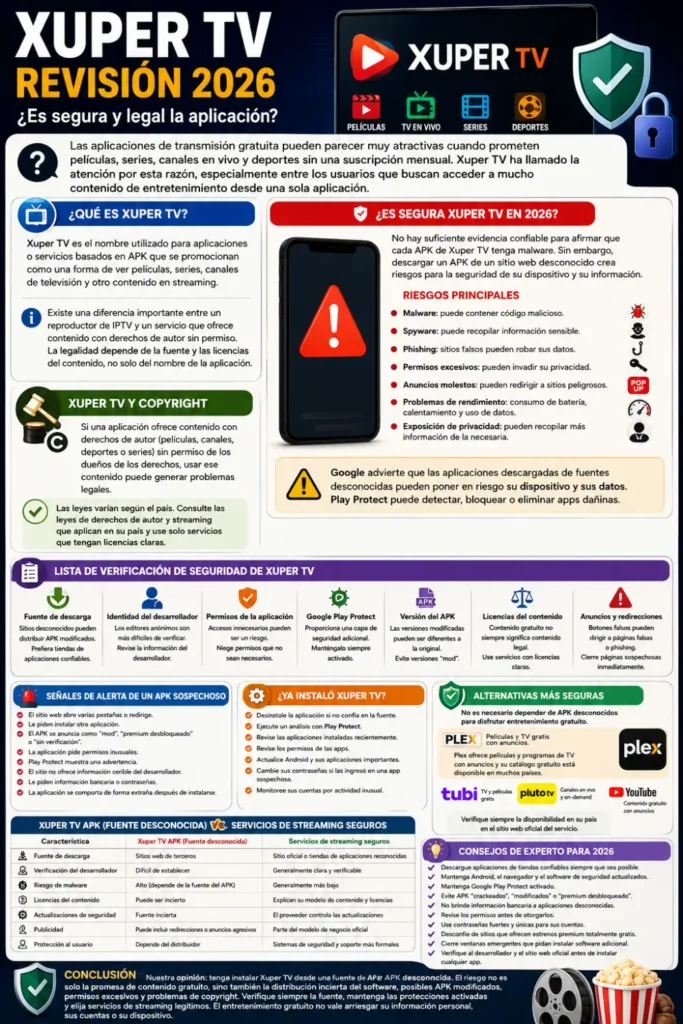
However, the biggest question is not simply whether Xuper TV can play videos. The more important questions are where the app comes from, what permissions it requests, whether the APK has been independently verified, and whether the content is legally licensed. In this 2026 review, we look at those issues so users can make a more informed decision instead of judging the app only by its free-content promise.
What Is Xuper TV?
Xuper TV is a name used for applications or APK-based services promoted as a way to watch movies, series, television channels, and other streaming content. Because APK files can be distributed through many third-party websites, users should be careful when assuming that every website offering an “Xuper TV APK” is providing the same software or an authentic version.
You can also read: Install Xuper TV on Fire TV Stick
There is also an important distinction between an IPTV player and a service that supplies copyrighted channels or movies. An app can technically function as a media player while the legality of the playlists or streams loaded into it depends on their source and licensing. For that reason, simply seeing the Xuper TV name in an app listing does not automatically prove that a particular version is safe, official, or legally authorized.
Xuper TV 2026 Safety Review: Is It Safe?
There is not enough reliable evidence to claim that every Xuper TV APK is automatically infected with malware. At the same time, downloading an APK from an unknown website creates a security risk because the file may have been modified, repackaged, or replaced with a malicious version.
Google specifically warns that applications downloaded from unknown sources can put a device and personal information at risk. Google Play Protect also checks applications installed from outside Google Play and can warn about, disable, or remove potentially harmful apps.
Why Third-Party APKs Need Extra Caution
The security problem is often the distribution method, rather than the name of the application alone. When a user searches for “Xuper TV APK 2026,” they may encounter multiple download pages, mirrors, modified APKs, misleading download buttons, or advertisements pretending to be the real download.
A file can also be changed after it leaves its original developer. This means an APK that worked normally for one person does not guarantee that another APK carrying the same name is safe.
Main Risks of Downloading Xuper TV APK
Before installing any streaming APK from an unfamiliar source, consider the following risks:
- Malware: A modified APK can potentially contain malicious code.
- Spyware: Some malicious applications attempt to collect sensitive information or monitor activity.
- Phishing: Fake download pages can redirect users to websites designed to steal passwords or financial information.
- Excessive permissions: An app requesting permissions unrelated to its core function deserves additional scrutiny.
- Unwanted advertisements: Aggressive pop-ups can lead users toward unsafe websites or deceptive downloads.
- Device performance problems: Suspicious software can contribute to battery drain, overheating, unusual data usage, or slow performance.
- Privacy exposure: Poorly designed or malicious applications may collect more information than users expect.
These risks should not be interpreted as proof that every Xuper TV installation contains malware. They explain why unknown APK sources should be treated cautiously, particularly when the application is not obtained through a trusted distribution channel.
You can also read: Xuper TV APK Latest Version 5.1.5
Xuper TV and Copyright: What Users Should Know
Security is only one side of the issue. The second is content licensing. If an application provides copyrighted movies, television channels, sports broadcasts, or series without permission from the relevant rights holders, using those streams can raise copyright concerns.
The exact legal position varies by country, so it would be inaccurate to say that every user faces identical legal consequences. Users should check the copyright and streaming laws that apply in their own country rather than assuming that “free” means legally available.
A useful rule is simple: look for information about who owns or licenses the content. Legitimate free streaming services normally have a business model, licensing arrangements, advertisements, or another clearly explained way of providing content legally.
Is Xuper TV Available on Google Play?
Users should be particularly cautious when they see websites claiming to offer an “official Xuper TV APK.” The existence of a website using an official-looking name does not by itself establish that the software is published by a verified developer.
Google recommends checking apps through trusted sources and warns that software obtained from unknown sources can expose devices and personal information to security risks. Play Protect is designed to scan applications, including apps installed from outside Google Play.
It is also worth noting that similarly named applications can exist. For example, an App Store listing currently using the name “Xuper Tv : Player app” describes itself as an IPTV player for users’ own M3U and Xtream-based playlists. That is not automatically evidence that it is the same service as an APK promoted as a source of free movies and live channels.
Xuper TV Safety Checklist
If you have already downloaded or are considering downloading an APK with the Xuper TV name, use this checklist before trusting it:
| What to Check | Why It Matters | Safer Approach |
|---|---|---|
| Download source | Unknown websites can distribute modified APKs | Prefer trusted app stores |
| Developer identity | Anonymous publishers are harder to verify | Check the developer and publisher information |
| App permissions | Unnecessary access can create privacy concerns | Deny permissions that are not required |
| Play Protect | Provides an additional security check | Keep Play Protect enabled |
| APK version | Modified versions may differ from the original | Avoid unofficial “mod” versions |
| Content licensing | Free content may not always be legally licensed | Use services with clear licensing |
| Pop-ups and redirects | Fake buttons may lead to phishing pages | Close suspicious pages immediately |
No checklist can guarantee that an application is completely safe, but these steps can substantially reduce unnecessary exposure.
What Permissions Should You Watch?
Permissions deserve attention because an application should generally request access that makes sense for its advertised functionality. A video player may need access to certain media or network functions, but a streaming application requesting unrelated sensitive information should make users stop and investigate.
On Android, users can review an application’s permissions through the device’s app settings. If an app requests access that appears unnecessary, consider denying it or uninstalling the application rather than granting every permission simply to make the app work.
Warning Signs of a Suspicious APK
Several warning signs should make you reconsider an installation:
- The download page opens several new tabs or redirects.
- The website repeatedly asks you to install another application.
- The APK is advertised as a “mod,” “premium unlocked,” or “no verification” version.
- The application requests unusual permissions.
- Play Protect displays a warning.
- The website provides no credible developer information.
- You are asked for banking information or passwords to activate the application.
- The app behaves differently immediately after installation.
One warning does not prove malware, but multiple warning signs together should be taken seriously.
What If You Already Installed Xuper TV?
If you installed an APK from an unfamiliar source and are now concerned, do not panic. Start by checking the application and its permissions, then run the security tools available on your Android device.
You can also read: Xuper TV 5.1.4 APK Version Details
Google says Play Protect can scan apps from sources outside Google Play and may warn about, disable, or remove potentially harmful applications. Keeping that protection enabled is therefore an important basic security measure.
Steps to Take After a Suspicious Installation
- Uninstall the app if you do not trust its source.
- Run a Play Protect scan from Google Play.
- Review recently installed applications and remove anything unfamiliar.
- Check app permissions for unusual access.
- Update Android and your important applications.
- Change important passwords if you entered them into a suspicious app or website.
- Monitor your accounts for unusual activity.
- Avoid downloading another APK from a different random website as a replacement.
If you entered banking credentials or other highly sensitive information into a suspicious application, contact the relevant service provider promptly and follow its security guidance.
Common Mistakes Users Make With Free Streaming APKs
One of the biggest mistakes is assuming that an application is safe because thousands of people appear to be using it. Popularity does not equal security. Malware can spread widely before it is detected, and fake websites can use copied reviews, download counters, and misleading claims to create trust.
Another common mistake is disabling security warnings simply because an APK refuses to install. Google explains that Play Protect can identify potentially harmful applications and may block or remove them. Turning off security protections just to install an unfamiliar application can remove an important layer of protection.
Better and Safer Alternatives to Xuper TV
Users who mainly want free entertainment do not necessarily need to rely on random APK downloads. Legitimate ad-supported services can provide free movies, TV programs, and other content without requiring users to search for unofficial APK files.
For example, Plex’s free movies and TV service offers free, ad-supported movies and television content, and Plex states that its free catalog is available to users in many countries.
Depending on your country and the content available there, other established streaming services may also provide legitimate free viewing options. Availability differs by region, so users should check the official service website or app rather than downloading an APK from an unrelated website.
Xuper TV vs Safer Streaming Options
The following comparison shows why the source of an application matters as much as its features:
| Feature | Xuper TV APK From Unknown Source | Established Free Streaming Service |
| Download source | May be a third-party website | Official website or recognized app store |
| Developer verification | Can be difficult to establish | Usually clearer |
| Malware risk | Depends heavily on APK source | Generally lower when obtained officially |
| Content licensing | May be unclear | Usually explains its content model |
| Security updates | Source may be uncertain | Provider normally controls updates |
| Advertising | Can include redirects or aggressive ads | Usually part of the official business model |
| User protection | Depends on the distributor | More formal security and support systems |
The table does not mean that every third-party APK is malicious or that every established service is risk-free. It highlights the difference between a controlled distribution system and an APK obtained from an unknown source.
Why “Free” Can Become Expensive
The appeal of free entertainment is obvious, but the financial cost of a security incident can be much greater than the price of a legitimate subscription. A compromised account, stolen credentials, fraudulent transaction, or damaged device can create far more trouble than saving money on streaming.
There is also a privacy cost that users sometimes overlook. If an application or website collects unnecessary personal information, users may not know how that information is stored, shared, or protected. Choosing established services with transparent privacy policies is generally a better approach.
Expert Tips for Safer Streaming in 2026
Good streaming security does not require advanced technical knowledge. A few habits can significantly reduce your exposure to malicious applications and deceptive websites.
- Download applications from trusted stores whenever possible.
- Keep Android, browsers, and security software updated.
- Leave Google Play Protect enabled.
- Avoid “cracked,” “modded,” or “premium unlocked” APKs.
- Do not provide banking information to an unknown streaming application.
- Review permissions before granting access.
- Use strong, unique passwords for important accounts.
- Be suspicious of websites offering newly released premium content completely free.
- Close pop-ups that ask you to install additional software.
- Check the developer and official website before installing an unfamiliar app.
These practices are useful beyond Xuper TV because the same techniques are frequently used to distribute other suspicious applications.
Conclusion
Our verdict: use caution, and avoid installing Xuper TV from an unknown APK source. The biggest concern is not simply the promise of free entertainment. It is the combination of uncertain software distribution, potentially modified APK files, unclear permissions, and possible copyright issues.
You can also read: Xuper TV APK Descargar Version 7.2.3 Details
That does not mean every application carrying the Xuper TV name is automatically malware. In fact, similarly named IPTV-player applications can have completely different purposes. The safer decision is to verify the exact developer, download source, permissions, and content licensing before installation.
Frequently Asked Questions
Is Xuper TV safe in 2026?
Safety depends on the exact application and where it was downloaded. An APK from an unknown or unofficial website carries additional security risk because it may have been modified. Google recommends caution with apps installed from unknown sources and uses Play Protect to scan for potentially harmful applications.
Can Xuper TV contain malware?
An unfamiliar APK can potentially be modified to contain malicious software. However, it would be inaccurate to state without reliable evidence that every Xuper TV APK contains malware. Users should evaluate the exact file, source, developer, permissions, and security warnings.
Is Xuper TV legal?
That depends on the specific content and licensing arrangements. Watching or distributing copyrighted content without authorization can create copyright issues, and laws differ between countries. Users should choose services that clearly provide licensed content.
Should I install an Xuper TV APK?
If the APK comes from an unknown third-party website, the safer choice is not to install it. Official app stores and established streaming services provide a more controlled environment.
What should I do if I already installed it?
If you do not trust the source, uninstall the application, run Google Play Protect, review permissions, update your device, and check for other unfamiliar applications. If you entered sensitive credentials into a suspicious app or website, take additional steps to secure those accounts.
What is the safest alternative to random streaming APKs?
Use established streaming services obtained through their official websites or recognized app stores. Free, ad-supported platforms such as Plex can provide movies and TV content without requiring users to rely on an unknown APK distributor.
Conclusion
Xuper TV may look appealing because it promises a large amount of entertainment without a traditional subscription. But in 2026, users should look beyond the free-content claim and consider APK security, developer verification, permissions, privacy, and copyright licensing.
The safest approach is straightforward: do not trust an APK simply because it has a popular name or promises free premium content. Verify the source, keep your device protections enabled, and choose legitimate streaming services whenever possible. Free entertainment is not worth putting your personal information, accounts, or device at unnecessary risk.