Xuper TV Account Creation Guide 2026: Fast, Safe & Easy Steps | Complete Guide

Creating a Xuper TV account is one of the easiest ways to unlock a better streaming experience. Although you can use the app in guest mode, registering an account lets you sync your preferences, log in on multiple devices, and recover your account if you ever reinstall the app. The registration process takes less than a minute and requires only a valid email address or a Google account.
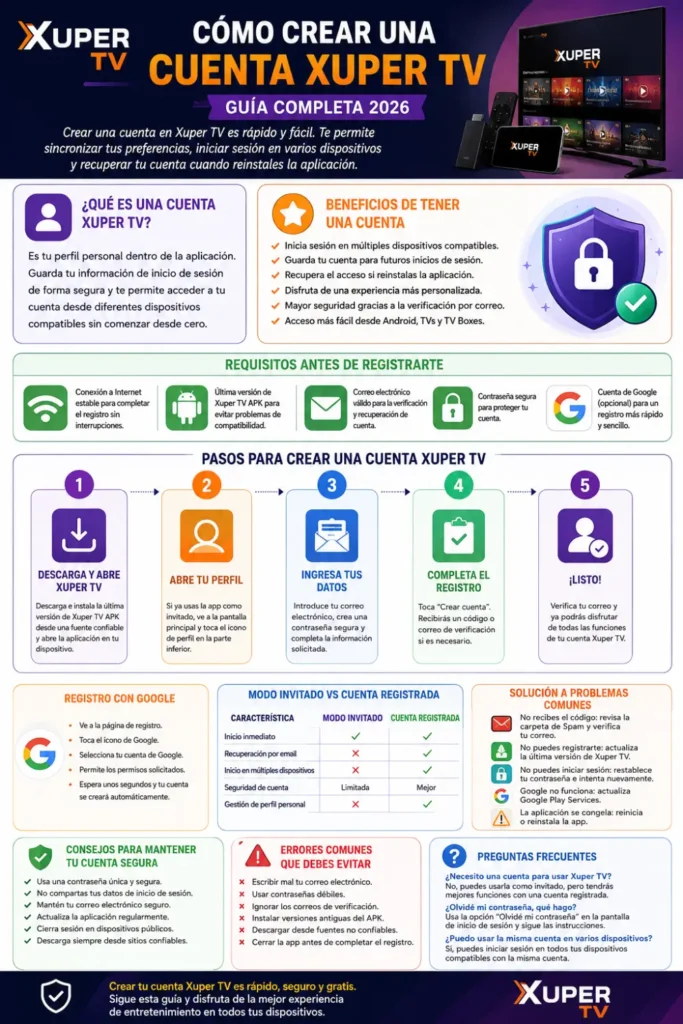
This updated 2026 guide explains everything you need to know about creating, verifying, and managing your Xuper TV account. Whether you’re using an Android phone, Android TV, Smart TV, Fire TV Stick, or TV Box, these step-by-step instructions will help you complete the process quickly and securely. If you download the Xuper TV app, you can benefit a lot from it. Through this app, you can watch sports drama series videos in HD at home.
Benefits of Creating a Xuper TV Account
Creating an account provides several advantages beyond basic streaming.
- Sign in from multiple supported devices.
- Save your account for future logins.
- Recover access if you reinstall the app.
- Enjoy a more personalized experience.
- Better account security through email verification.
- Easier access across Android phones, TVs, and TV Boxes.
While guest mode is suitable for temporary use, a registered account offers greater convenience for long-term users.
Requirements Before You Register
Before starting the registration process, make sure you have everything ready.
| Requirement | Purpose |
|---|---|
| Stable internet connection | Required for registration and verification |
| Latest Xuper TV APK version | Prevents compatibility issues |
| Valid email address | Used for verification and recovery |
| Secure password | Protects your account |
| Google account (optional) | Faster registration method |
Meeting these requirements helps ensure a smooth registration without interruptions.
How to Create a Xuper TV Account
Creating an account only takes a few simple steps.
Step 1: Download and Open Xuper TV
Download the latest version of Xuper TV APK from a trusted source and install it on your device. Once installed, launch the application.
If you’re opening the app for the first time, you’ll usually see the Create Account option on the welcome screen.
Step 2: Open Your Profile
If you’ve already been using the app as a guest, open the main screen and locate the profile icon at the bottom of the application.
Tap the profile icon to access the account section, where you’ll find the registration option.
Step 3: Enter Your Information
The registration page asks for basic account details.
Enter:
- Your email address
- A strong password
- Any additional information requested
Double-check your email before continuing because it will be used for verification and password recovery.
Step 4: Complete Registration
After entering your details, tap Create Account.
The app will process your request within a few seconds and send a verification code or email if required.
Once verified, your Xuper TV account is ready to use.
How to Register Using Google
If you prefer a faster registration process, you can use your Google account.
Simply follow these steps:
- Open the registration page.
- Tap the Google icon.
- Choose the Google account you want to use.
- Allow the requested permissions.
- Wait a few seconds for the account to be created automatically.
Google Sign-In reduces typing and makes logging in easier on future devices.
You can also read: Install Xuper TV APK
How to Verify Your Account
Some users receive a verification code after registration. This helps confirm ownership of the email address and improves account security.
If prompted, enter the verification code exactly as received. After successful verification, you can immediately access all available account features.
How to Log In to Your Xuper TV Account
Logging in is simple if you’ve already created an account.
Follow these steps:
- Open Xuper TV.
- Tap the Profile icon.
- Select Sign In.
- Enter your email and password.
- Tap Login.
If you registered using Google, simply choose Continue with Google and select your linked account.
Guest Mode vs Registered Account
Both options allow you to use Xuper TV, but they provide different experiences.
| Feature | Guest Mode | Registered Account |
| Start instantly | ✔ | ✔ |
| Email recovery | ✘ | ✔ |
| Multi-device login | ✘ | ✔ |
| Account security | Limited | Better |
| Personal account management | ✘ | ✔ |
For occasional use, guest mode works well. For regular streaming, a registered account is the better choice.
Common Account Creation Problems and Solutions
Most registration issues are easy to fix without technical knowledge.
| Problem | Possible Solution |
| Verification code not received | Check Spam folder and verify your email address |
| Registration fails | Update to the latest Xuper TV APK |
| Unable to log in | Reset your password and try again |
| Google Sign-In not working | Update Google Play Services |
| App freezes | Restart the app or reinstall it |
If problems continue, check your internet connection and ensure you’re using the latest version of the application.
Tips to Keep Your Xuper TV Account Safe
A few simple security practices can help protect your account.
- Use a unique password.
- Never share your login details.
- Keep your email account secure.
- Update the app regularly.
- Log out from public or shared devices.
- Avoid downloading modified APK versions from untrusted websites.
Following these best practices reduces the risk of unauthorized account access.
Common Mistakes to Avoid
Many users accidentally create registration problems by making small mistakes.
Avoid these common errors:
- Typing the wrong email address.
- Using a weak password.
- Ignoring verification emails.
- Installing outdated APK versions.
- Using unreliable download sources.
- Closing the app before registration finishes.
Taking an extra minute to review your information can prevent unnecessary login issues later.
Frequently Asked Questions
Do I need a Xuper TV account to use the app?
No. You can use Xuper TV in guest mode without creating an account. However, registering provides additional features, improved security, and easier access across devices.
What should I do if I forget my password?
Use the Forgot Password option on the login screen. Follow the instructions sent to your registered email address to reset your password.
Can I use the same account on multiple devices?
Yes. You can sign in using the same account on compatible supported devices, making it easier to switch between your phone, TV, and Android TV Box.
Why am I not receiving the verification code?
Check your spam or junk folder first. Also verify that you entered the correct email address and ensure your internet connection is working properly.
Can I change my email address later?
Depending on the app version and account settings, some account information may be editable. Check the account settings section for available options.
Is Google Sign-In safe?
Yes. Using Google Sign-In is generally a secure and convenient authentication method because it reduces password management while providing trusted account verification.
Conclusion
Creating a Xuper TV account in 2026 is a quick process that usually takes less than a minute. Whether you register using your email address or Google account, a registered profile provides better security, easier device access, and a more convenient streaming experience than guest mode.
By following the steps, security tips, and troubleshooting advice in this guide, you can create, verify, and manage your Xuper TV account with confidence. Keeping your login information secure and using the latest version of the app will help ensure a smooth streaming experience on all your compatible devices.